Queue-Based Architecture: When to Use BullMQ and Redis
Queues are one of the most practical ways to make backend systems faster, more reliable, and easier to scale. This article explains when to use BullMQ and Redis for background jobs, async processing, retries, scheduled tasks, and production SaaS workflows.
- #bullmq
- #redis
- #queue-based-architecture
- #background-jobs
- #backend-architecture
- #nestjs
- #saas
- #scalable-systems
- #job-processing
- #event-driven-architecture
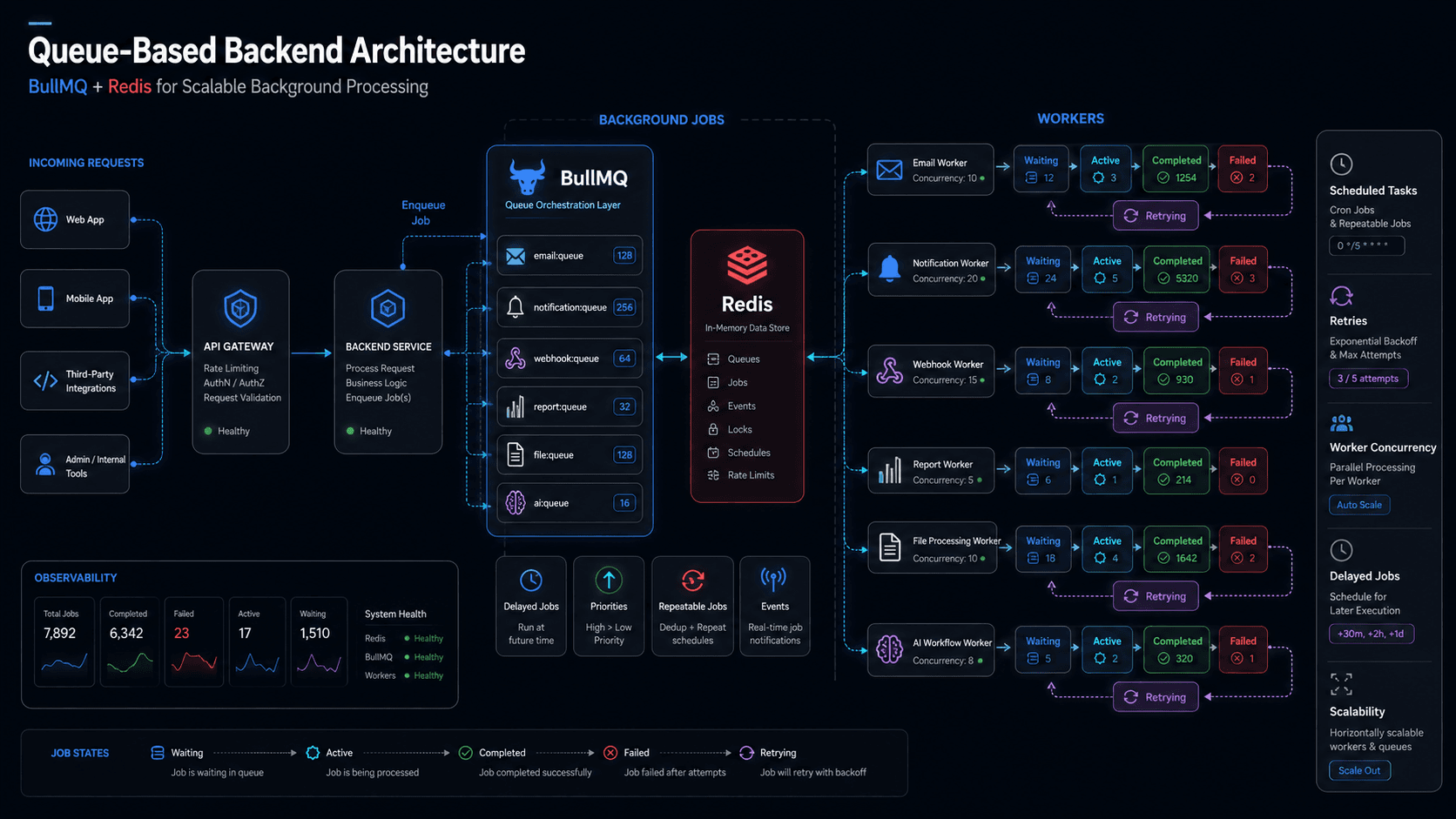
Queue-Based Architecture: When to Use BullMQ and Redis
Many backend systems start with a simple request-response flow.
A user clicks a button. The frontend sends an API request. The backend performs the operation. The backend returns a response.
For small features, this works well.
But as a product grows, not every task should happen inside the main API request.
Some tasks are slow. Some depend on third-party services. Some may fail and need retries. Some should run later. Some should run on a schedule. Some require heavy processing. Some should continue even if the user closes the browser.
This is where queue-based architecture becomes useful.
In Node.js and NestJS systems, one of the most practical queue setups is BullMQ with Redis.
BullMQ handles job creation, workers, retries, delays, repeatable jobs, and processing logic. Redis acts as the fast storage and coordination layer behind the queue.
Together, they help backend systems process work more reliably without slowing down the user experience.
What Is Queue-Based Architecture?
Queue-based architecture means the system does not process every task immediately inside the API request.
Instead, the backend adds a job to a queue.
A worker process picks up that job and performs the task in the background.
A simple flow looks like this:
User performs an action.
API validates the request.
API stores required data.
API adds a background job to the queue.
API responds quickly to the user.
Worker processes the job separately.
System logs success or failure.
This pattern is very useful when the task does not need to block the user.
For example, when a user signs up, the API does not need to wait until the welcome email is fully sent before returning a response. The backend can create the user, add an email job to the queue, and immediately respond.
The email worker can send the email in the background.
This improves speed and reliability.
Why Not Process Everything Immediately?
The problem with processing everything immediately is that the user request becomes dependent on every step.
Imagine this flow:
Create userSend welcome emailCreate CRM contactNotify adminGenerate onboarding tasksReturn response
If the email provider is slow, the user waits.
If the CRM API fails, the whole request may fail.
If notification sending takes time, the API becomes slower.
This is not ideal.
The user only needs to know that their account was created successfully. The rest can happen in the background.
Queue-based architecture separates critical work from secondary work.
Critical work happens immediately.
Background work happens through queues.
Where BullMQ Fits In
BullMQ is a Node.js queue library built on Redis.
It is commonly used for:
background jobs
delayed jobs
repeatable jobs
retries
job priorities
worker processing
failed job handling
scheduled tasks
async workflows
In a NestJS backend, BullMQ is often used for jobs like:
sending emails
sending notifications
processing files
handling webhooks
generating reports
syncing third-party data
running AI workflows
importing CSV data
cleaning old records
processing payments after webhook events
BullMQ gives structure to background processing.
Instead of writing random async functions inside controllers or services, you create queues and workers for specific responsibilities.
Where Redis Fits In
Redis is the storage and coordination layer behind BullMQ.
BullMQ uses Redis to manage job data, job status, delays, retries, locks, and worker coordination.
Redis is fast, which makes it suitable for high-throughput job processing.
In queue-based architecture, Redis is not usually the main business database. It is used for temporary and operational job state.
For example, Redis may store:
job waiting
job active
job completed
job failed
job delayed
job attempts
job locks
repeatable job schedules
Your durable business data should usually remain in your main database, such as PostgreSQL.
Redis helps coordinate the jobs.
The database keeps the business source of truth.
When Should You Use a Queue?
You should use a queue when the task has one or more of these characteristics:
it is slow
it can fail
it depends on an external service
it needs retry logic
it should run later
it should run on a schedule
it processes large data
it should not block the user
it can be handled by a worker
it needs controlled concurrency
If a task is fast, simple, and must happen immediately before the response, it may not need a queue.
A good architecture does not put everything into queues.
It puts the right work into queues.
Use Queues for Sending Emails
Email sending is one of the most common use cases for queues.
Examples include:
welcome email
password reset email
invoice email
verification email
subscription reminder
admin notification
weekly summary email
Email providers can be slow or temporarily unavailable.
If email sending happens directly inside the API request, the user may experience slow responses or random failures.
A better approach is:
API creates the required record.
API adds email job to queue.
API returns success.
Email worker sends the email.
Failed email jobs retry automatically.
This keeps the user flow fast while still making email delivery reliable.
Use Queues for Notifications
Notifications can also be moved to queues.
Examples include:
in-app notifications
push notifications
Slack notifications
SMS notifications
admin alerts
activity reminders
task assignment alerts
Notification systems often grow over time.
At first, you may send only one notification. Later, one action may trigger multiple notifications across different channels.
Without queues, this becomes messy.
With queues, the main system can publish a notification job, and workers can process different notification channels separately.
This makes the system easier to extend.
Use Queues for File Processing
File processing should usually not block the main request.
Examples include:
image resizing
video processing
PDF generation
document parsing
CSV import
Excel import
invoice generation
report export
file compression
virus scanning
Some file tasks take seconds or minutes.
If the API waits for them, the request may timeout.
A better pattern is:
User uploads file.Backend stores file metadata.Backend adds processing job.User sees “processing” status.Worker processes file.Status updates to completed or failed.
This is much better for user experience.
It also allows retries and progress tracking.
Use Queues for Reports and Exports
Reports can be expensive to generate.
For example:
monthly analytics report
large CSV export
PDF invoice batch
business performance dashboard export
compliance report
audit log export
If a report requires many database queries or large data processing, it should not run inside the main request.
Instead, the backend can create a report job.
The user can see a status like:
pending
processing
completed
failed
When the report is ready, the system can send a notification or provide a download link.
This pattern is useful for SaaS dashboards, admin panels, financial systems, and internal business tools.
Use Queues for Webhook Processing
Webhooks are a major reason to use queues.
Many SaaS systems integrate with services like:
Stripe
PayPal
DocuSign
Slack
Zoom
GitHub
CRMs
accounting tools
AI platforms
logistics APIs
Webhook endpoints should usually respond quickly.
The external service expects your server to acknowledge the webhook. If your server takes too long, the service may retry or mark the webhook as failed.
A good webhook flow is:
Receive webhook.Verify signature.Store webhook event.Add processing job to queue.Return success quickly.Worker processes business logic.
This makes webhook handling more reliable.
It also prevents third-party retry storms caused by slow webhook endpoints.
Use Queues for Payment Events
Payment systems need careful handling.
When a payment provider sends an event, you may need to:
verify payment
update subscription
generate invoice
send receipt
unlock features
notify admin
update analytics
sync CRM
This should be handled reliably.
Queue-based processing helps because payment workflows may involve multiple steps and external services.
A payment webhook should not directly perform every action before returning a response.
It should validate, store, queue, and process.
This gives you better control, retries, and auditability.
Use Queues for AI Workflows
AI features are often slow, expensive, and unpredictable.
Examples include:
generating summaries
processing documents
analyzing conversations
extracting structured data
running agentic workflows
generating embeddings
classifying tickets
transcribing audio
creating reports from user data
AI requests can timeout. Model providers can fail. Costs need to be controlled. Some workflows may take longer than normal API requests.
Queues are very useful here.
A good AI workflow may look like:
User uploads document.API stores document metadata.API adds AI processing job.Worker calls AI provider.Worker stores result.User receives notification when ready.
This keeps the product responsive and gives better control over retries, rate limits, and cost.
Use Queues for Scheduled Jobs
Some jobs need to run on a schedule.
Examples include:
daily email summaries
subscription renewal checks
invoice generation
data cleanup
report generation
reminder notifications
expired session cleanup
trial expiration checks
weekly analytics processing
BullMQ supports repeatable jobs, which can be used for scheduled background tasks.
For many SaaS systems, scheduled jobs are important because business operations continue even when users are not actively using the app.
Use Queues for Retryable Work
One of the biggest benefits of queues is retry handling.
External services fail.
Email providers fail.
Payment APIs timeout.
AI providers return errors.
CRMs reject requests.
Network issues happen.
Without a queue, the system may lose the task or force the user to try again manually.
With a queue, you can retry failed jobs automatically.
For example:
attempt 1 failed
wait 10 seconds
attempt 2 failed
wait 1 minute
attempt 3 succeeded
This is much better than failing the whole user action because one external service was temporarily unavailable.
Use Queues for Controlled Concurrency
Sometimes the problem is not speed.
The problem is too much speed.
For example, you may not want to process 10,000 emails at the same time. You may not want to call an AI API with unlimited concurrency. You may not want to process huge files all at once.
Queues allow controlled concurrency.
You can decide how many jobs a worker should process at the same time.
For example:
email worker concurrency: 10
AI worker concurrency: 2
file processing worker concurrency: 5
webhook worker concurrency: 20
This protects your system and third-party services from overload.
When Not to Use a Queue
Queues are powerful, but they are not needed everywhere.
Do not use a queue just because it sounds scalable.
Avoid queues when:
the task is very fast
the result is required immediately
the logic is simple
failure should stop the request
adding async complexity gives no real benefit
For example, validating a password, checking permissions, creating a simple database record, or returning dashboard data usually should not be queue-based.
Queues add operational complexity.
You need workers, Redis, monitoring, retries, failure handling, and deployment planning.
Use queues when the benefit is clear.
Common Mistakes with Queues
Queue-based systems can also fail if they are not designed properly.
Common mistakes include:
putting everything into queues
not storing job results
no retry strategy
no dead-letter handling
no job status tracking
no idempotency
no logging
no monitoring
no worker scaling plan
no Redis persistence strategy
processing payment/webhook jobs multiple times without safeguards
A queue is not magic.
It needs proper architecture.
Idempotency Is Important
Idempotency means a job can run more than once without causing duplicate damage.
This is very important in queue systems because jobs may retry.
For example, if a payment webhook job runs twice, it should not create two subscriptions or send two invoices.
If an email job retries, you may or may not want duplicate emails.
If a CSV import retries, it should not duplicate all records.
A good job should have safeguards like:
unique job IDs
database constraints
processed event tracking
external event IDs
status checks
transaction boundaries
This makes retries safe.
Job Status Should Be Visible
For background work, users and admins often need to know what is happening.
For example, after uploading a file, the user should know whether it is:
pending
processing
completed
failed
For admin systems, job visibility is even more important.
You may need to know:
which jobs failed
why they failed
how many retries happened
which worker processed them
how long they took
whether a job is stuck
Without visibility, queue systems become hard to debug.
Queue Monitoring Matters
Production queues need monitoring.
You should monitor:
waiting jobs
active jobs
completed jobs
failed jobs
delayed jobs
stuck jobs
worker health
job processing time
Redis memory usage
retry count
error patterns
If the queue grows too much, it may mean workers are not keeping up.
If failed jobs increase, an external integration may be broken.
If Redis memory grows unexpectedly, job cleanup may not be configured properly.
Queues should be observable, not hidden.
BullMQ in a NestJS Architecture
In a NestJS backend, I usually prefer separating queue logic clearly.
For example:
modules/
  notifications/
    notifications.service.ts
    notifications.queue.ts
    notifications.processor.ts

  emails/
    emails.service.ts
    emails.queue.ts
    emails.processor.ts

  reports/
    reports.service.ts
    reports.queue.ts
    reports.processor.ts

  integrations/
    webhook-events.service.ts
    webhook-events.processor.ts
The controller should not contain queue logic directly.
The service should decide what business action is needed.
The queue producer should add jobs.
The processor should handle background execution.
This keeps the system clean and maintainable.
Example: User Signup Flow
Without queue:
Create user
Send welcome email
Notify admin
Create CRM record
Return response
If any external service is slow, signup becomes slow.
With queue:
Create user
Add welcome email job
Add admin notification job
Add CRM sync job
Return response
Workers handle the secondary tasks.
The user gets a faster experience, and failed jobs can retry.
Example: CSV Import Flow
A CSV import is a perfect use case for queues.
Better flow:
User uploads CSV.
API stores upload record.
API adds import job.
Worker validates rows.
Worker inserts valid records.
Worker stores failed rows.
User sees import result.
This avoids request timeouts and gives better control over large data processing.
Example: AI Document Processing
AI workflows are another strong queue use case.
Flow:
User uploads document.
API stores file metadata.
API adds AI processing job.
Worker extracts text.
Worker calls AI model.
Worker stores structured output.
User receives result when ready.
This is much better than making the user wait on a long API request.
My Preferred Queue-Based Pattern
For production SaaS systems, I prefer this pattern:
API Layer: Validates request, performs critical synchronous work, and creates jobs. Queue Producer: Adds jobs with clear names, payloads, priority, delay, and retry settings. Redis: Stores queue state, job data, locks, delays, and worker coordination. Worker: Processes jobs outside the request flow. Database: Stores durable business records, job status when needed, and processed external events. Monitoring: Tracks failed jobs, stuck jobs, worker health, and queue backlog.
This creates a clean separation between user-facing APIs and background processing.
Final Thoughts
Queue-based architecture is one of the most useful patterns in production backend systems.
It helps SaaS products stay fast, reliable, and scalable by moving slow, retryable, scheduled, and external-service-dependent work outside the main request flow.
BullMQ and Redis are a strong combination for Node.js and NestJS systems because they provide practical background job processing without forcing the complexity of a full distributed messaging platform too early.
But queues should be used carefully.
Do not put everything into queues.
Use them for the work that truly benefits from asynchronous processing: emails, notifications, files, reports, webhooks, payments, AI workflows, imports, retries, and scheduled jobs.
A good backend is not only about handling requests.
It is also about knowing what should happen now, what should happen later, and what should keep running reliably in the background.
Frequently asked questions
- When should I use BullMQ and Redis in a backend system?
- Use BullMQ and Redis when you need background jobs, retries, delayed tasks, scheduled jobs, webhook processing, file processing, email sending, notifications, imports, reports, or AI workflows that should not block the main API request.
- Is Redis the database for BullMQ jobs?
- Redis is the queue storage and coordination layer for BullMQ. It manages job state, delays, retries, locks, and worker coordination. Your main business data should usually remain in a durable database like PostgreSQL.
- Should every backend task use a queue?
- No. Fast and required tasks should usually stay synchronous. Queues are best for slow, retryable, scheduled, external-service-dependent, or background work.
- Why are queues useful for SaaS products?
- Queues help SaaS systems stay responsive and reliable by moving slow tasks like emails, reports, file processing, webhooks, payments, and AI workflows outside the main request-response flow.
- What is the biggest mistake in queue-based architecture?
- The biggest mistake is using queues without idempotency, monitoring, retry strategy, and failure handling. A queue improves reliability only when jobs are designed safely.