What Clients Should Prepare Before Starting a Software Project
A successful software project does not start with coding. It starts with clarity. Before hiring a developer or software team, clients should prepare their business goals, core features, user roles, workflows, budget range, timeline, references, integrations, and future product vision.
- #software-project-planning
- #client-guide
- #software-development
- #mvp-planning
- #saas-development
- #project-requirements
- #product-discovery
- #custom-software
- #startup-development
- #software-agency
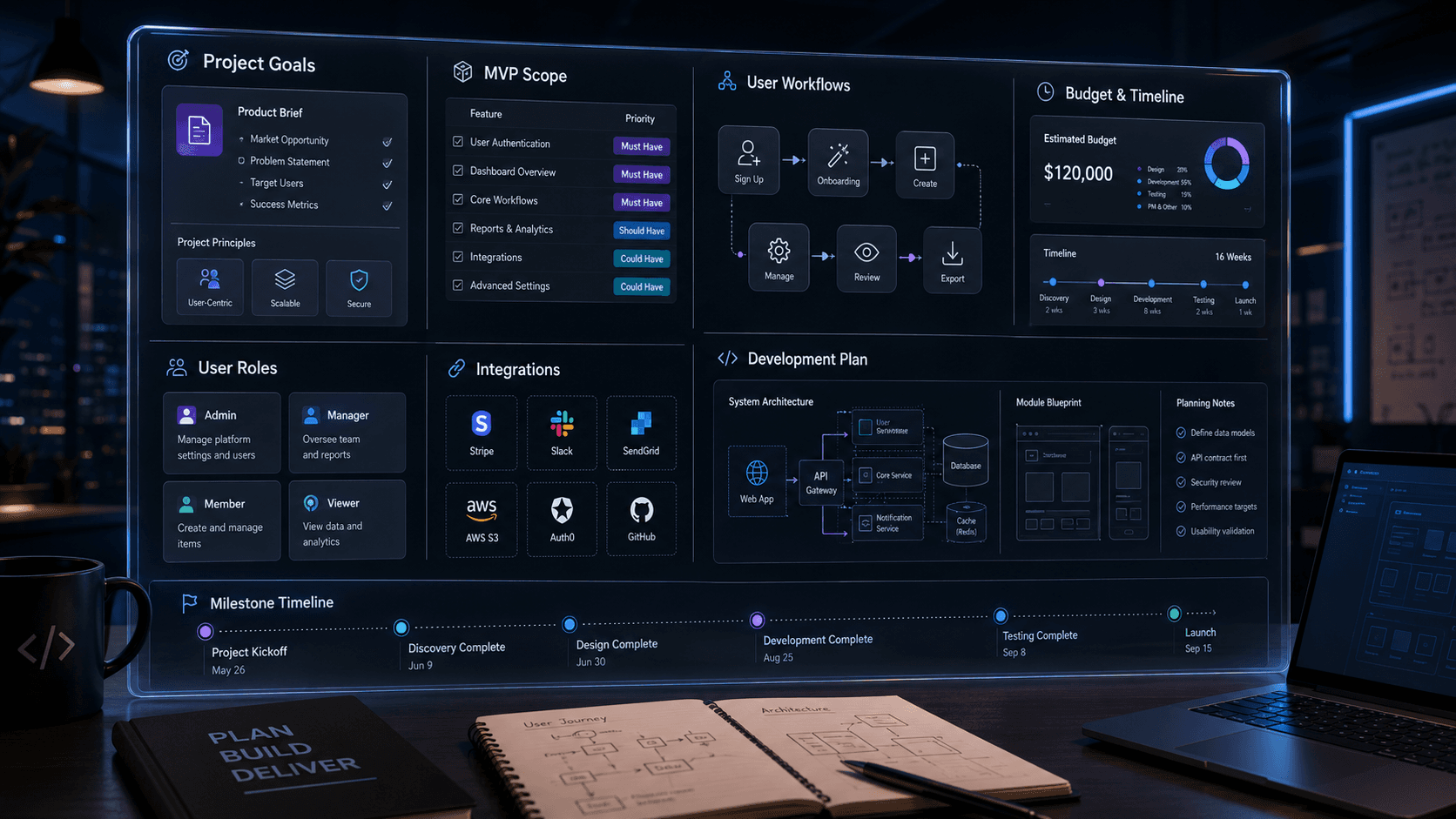
What Clients Should Prepare Before Starting a Software Project
Many software projects become delayed, expensive, or confusing because they start without enough clarity.
The client has an idea.
The developer starts asking questions.
The scope keeps changing.
The estimate becomes difficult.
The timeline becomes unclear.
And after development starts, both sides realize that some important details were not discussed properly.
This is not always because the idea is bad or the development team is weak. Most of the time, the project simply started without enough preparation.
A successful software project does not begin with coding.
It begins with clarity.
Before hiring a developer, software agency, or technical team, clients should prepare the most important business and product details. This helps the development team understand the project properly, estimate accurately, suggest the right technical approach, and avoid unnecessary delays later.
This article explains what clients should prepare before starting a software project.
Start with the Business Problem
The first thing to prepare is the problem you want to solve.
Many clients start by saying:
“I need a mobile app.”
or:
“I need a website.”
or:
“I want a SaaS platform.”
That is a good starting point, but it is not enough.
The better question is:
“What business problem should this software solve?”
For example:
Are you trying to automate manual work?
Are you trying to reduce operational cost?
Are you trying to improve customer experience?
Are you trying to build a new revenue stream?
Are you trying to manage employees, customers, orders, bookings, vehicles, leads, or reports?
Are you trying to replace an existing outdated system?
When the business problem is clear, the software becomes easier to plan.
A development team can suggest better workflows, architecture, and priorities when they understand the real goal behind the project.
Define the Target Users
Every software product has users.
Before development starts, you should define who will use the system.
For example:
customers
admins
managers
employees
vendors
drivers
students
teachers
doctors
patients
agents
business owners
support staff
This is important because different users need different access, dashboards, and workflows.
A customer may only need to place an order.
A manager may need to review reports.
An admin may need to manage users.
A support team may need to handle complaints.
If user types are not clear from the beginning, the system can become messy later.
Prepare the Main User Workflows
A workflow explains how a user completes a task inside the software.
For example, in a booking app:
1. Customer selects a service. 2. Customer chooses a date and time. 3. Customer enters details. 4. Customer confirms booking. 5. Admin receives booking request. 6. Admin approves or rejects. 7. Customer receives notification.
In a CRM:
1. Sales team adds a lead. 2. Lead is assigned to a team member. 3. Team member follows up. 4. Lead status changes. 5. Manager views pipeline report.
In a SaaS platform:
1. User signs up. 2. User creates an organization. 3. User invites team members. 4. Team members perform actions based on roles. 5. Owner manages billing and settings.
Before development, try to describe the main workflows in simple steps.
You do not need technical language.
You only need to explain how the business should work.
Separate MVP Features from Future Features
One of the biggest reasons software projects become delayed is unclear scope.
Clients often want everything in the first version.
But a first version should not include every possible feature.
A better approach is to separate features into three groups:
Must-have features Good-to-have features Future features
Must-have features are required for the product to work.
Good-to-have features can improve the product but are not required for launch.
Future features can come in later phases.
For example, a SaaS MVP may need:
user signup login dashboard core business workflow admin panel basic notifications basic reports
But future versions may include:
advanced analytics AI automation billing plans white-label options mobile apps third-party integrations enterprise permissions audit logs
This separation helps control budget and timeline.
It also helps the development team build a focused first version without ignoring the future.
Prepare a Feature List
A feature list does not need to be perfect, but it should be clear.
Instead of writing:
I need an app like Uber.
Write something like:
Customer can register and login. Customer can search available drivers. Customer can book a ride. Driver can accept or reject ride. Admin can manage users and bookings. System should send notifications. Admin should see reports.
This gives the development team something concrete to understand.
A clear feature list helps with:
cost estimation
timeline planning
technical architecture
UI/UX planning
database design
team allocation
milestone planning
Without a feature list, estimates are usually rough and risky.
Prepare Design References
Design references are very helpful.
You do not need to have a complete UI/UX design before contacting a developer.
But it helps if you can share examples of apps, websites, or dashboards you like.
For example, you can prepare:
competitor websites
mobile app screenshots
dashboard examples
color preferences
branding guidelines
existing logo
existing website
Figma file if available
rough wireframes
hand-drawn sketches
Design references help the team understand your taste and expectations.
They also reduce back-and-forth during UI planning.
But remember: design references are not exact copies.
They are used for direction, inspiration, and product understanding.
Prepare Your Content and Branding
Many projects get delayed because content is not ready.
Before development starts, prepare anything related to your brand and content.
This may include:
company name
logo
brand colors
tagline
website copy
product descriptions
service details
pricing text
privacy policy
terms and conditions
email templates
images or media
testimonials
FAQs
If content is not ready, the development team may use placeholder content.
That is okay for early design, but final delivery needs real content.
For portfolio websites, landing pages, business websites, and SaaS marketing pages, content preparation is especially important.
Define Admin Requirements
Many clients focus only on the user-facing side and forget the admin side.
But most software products need an admin panel.
Before development starts, think about what the admin should manage.
For example:
users
roles
orders
bookings
complaints
payments
subscriptions
reports
notifications
content
settings
approvals
support requests
Also think about admin permissions.
Will there be only one admin?
Or will there be multiple admin roles?
For example:
Super Admin Manager Support Staff Finance User Content Manager
If admin requirements are not planned, the business may depend on developers for basic changes after launch.
A good admin panel gives the business control.
List Required Integrations
Modern software usually connects with other services.
Before starting the project, prepare a list of integrations you need.
Examples include:
payment gateway
email service
SMS provider
WhatsApp API
Google Maps
CRM
ERP
accounting software
calendar
Zoom
Slack
Microsoft Teams
DocuSign
AI models
cloud storage
analytics tools
For each integration, clarify:
Is it required in MVP?
Do you already have an account?
Is API access available?
Does it need webhooks?
Does it need approval from the provider?
Are there usage costs?
Integrations can affect project cost, timeline, and architecture.
They should not be added as an afterthought.
Prepare Existing System Details
If the new software will replace or connect with an existing system, prepare details about the current system.
This may include:
current software name
current problems
exported data
user roles
existing workflows
reports
integrations
limitations
login access for review
screenshots or videos
API documentation if available
This helps the development team understand what should be improved or migrated.
For example, if a client wants to replace an old LMS, CRM, or internal tool, the new system should not be planned blindly. The current system’s strengths and weaknesses should be studied.
Prepare Data and Migration Requirements
If your project needs existing data to be moved into the new system, tell the development team early.
Data migration may include:
users
customers
orders
invoices
products
leads
documents
reports
subscriptions
old records
Migration can be simple or complex depending on the data quality and structure.
Important questions include:
Where is the current data stored?
Is it in Excel, CSV, database, or another software?
Is the data clean?
Are there duplicates?
Are fields missing?
Does old data need to match new system fields?
Should all data be migrated or only recent data?
Data migration can affect timeline and budget, so it should be discussed early.
Define Security and Access Needs
Security should not be ignored.
Before starting a software project, think about the type of data the system will handle.
For example:
customer data
payment data
medical data
financial data
documents
internal company data
employee records
student records
location data
The more sensitive the data, the more carefully the system should be planned.
Security requirements may include:
secure login
password reset
email verification
role-based access
two-factor authentication
audit logs
data encryption
secure file access
admin activity tracking
session management
Not every project needs enterprise-level security in version one.
But every project needs responsible security decisions.
Prepare Budget Range
Many clients avoid sharing budget because they think the developer will adjust the price based on the budget.
But a budget range actually helps the development team suggest the right approach.
For example, the same product idea can be built in different ways:
MVP version Scalable version Enterprise version
Each version has different cost, timeline, architecture, and feature depth.
If the budget is clear, the team can suggest what is realistic.
A serious development team should not simply use your budget as a price target. They should help you understand what can be done properly within that range.
Without budget clarity, both sides may waste time discussing a scope that does not match the available investment.
Prepare Timeline Expectations
Timeline is also important.
Before development starts, prepare your expected launch date or deadline.
But be realistic.
A serious software product needs time for:
planning
UI/UX
frontend development
backend development
API integration
testing
deployment
revisions
content finalization
app store review if mobile apps are involved
If the deadline is fixed, the scope may need to be reduced.
If the scope is fixed, the timeline may need to increase.
This balance should be discussed early.
Decide Who Will Give Feedback
Software projects slow down when feedback is unclear.
Before starting, decide who will approve designs, features, and milestones.
If too many people give conflicting feedback, the project becomes delayed.
A good process usually needs:
one main decision-maker
one backup contact
clear feedback deadlines
organized review comments
agreed communication channel
This helps the team move faster.
Feedback should be specific.
Instead of saying:
Make it better.
Say:
The dashboard cards look too large. Please reduce the height and make the status labels more visible.
Clear feedback leads to faster improvements.
Prepare Communication Expectations
Before starting the project, define how communication will happen.
For example:
WhatsApp
Slack
email
Google Meet
Zoom
Trello
Jira
ClickUp
Notion
Also decide:
how often updates are needed
when meetings will happen
how urgent issues will be handled
where tasks will be tracked
how approvals will be given
Good communication reduces confusion.
Bad communication creates delays even when the development team is working properly.
Prepare Testing Responsibility
Testing is not only the developer’s job.
The development team should test the system technically, but the client should also test business workflows.
For example, the developer may confirm that a booking form works.
But the client should confirm whether the booking rules match the real business process.
Before starting, understand that testing usually includes:
developer testing
QA testing if included
client acceptance testing
real workflow testing
bug fixing
final review
Clients should allocate time for testing and feedback before launch.
Prepare Post-Launch Expectations
A software project does not end at launch.
After launch, there may be:
bug fixes
user feedback
performance improvements
new features
content changes
admin training
monitoring
server updates
security patches
integration fixes
Before development starts, discuss what happens after launch.
Important questions include:
Will there be a support period?
Who will maintain the server?
Who will handle bugs?
How will new features be estimated?
Will there be monthly maintenance?
Who owns the codebase?
Where will credentials be stored?
Who manages hosting and domains?
These details prevent confusion later.
A Simple Software Project Preparation Checklist
Before contacting a software team, prepare this checklist:
Business problem Target users Main workflows MVP feature list Future feature list Design references Branding and content Admin requirements Required integrations Existing system details Data migration needs Security requirements Budget range Timeline expectations Decision-maker Communication channel Testing availability Post-launch support expectations
You do not need every answer to be perfect.
But the more you prepare, the smoother the project becomes.
Example: Weak Project Brief vs Strong Project Brief
A weak brief looks like this:
I need an app like Airbnb. How much will it cost?
This is too broad.
A stronger brief looks like this:
I want to build a rental booking platform for local holiday homes. Users: - property owners - guests - admin MVP features: - owner registration - property listing - guest search - booking request - admin approval - email notifications - basic payment integration Future features: - reviews - dynamic pricing - mobile app - owner analytics - advanced verification Timeline: I want to launch the MVP in 10 to 12 weeks. Budget: I am planning an MVP budget range and want your recommendation on what can be built first.
This brief gives the development team enough information to respond professionally.
Why Preparation Saves Money
Preparation reduces cost because it reduces uncertainty.
When the project is unclear, the team has to guess.
Guessing leads to wrong estimates, missed features, redesigns, rework, and delays.
When the project is clear, the team can:
estimate more accurately
plan the architecture properly
reduce unnecessary features
avoid repeated changes
build the right database structure
choose the right technology
create better milestones
launch faster
Good preparation does not make the project bigger.
It makes the project smarter.
Final Thoughts
A successful software project starts before coding begins.
Clients do not need to understand programming, databases, servers, or architecture in detail.
But they should prepare the business problem, users, workflows, features, budget, timeline, integrations, and future goals.
This preparation helps the development team build the right solution instead of guessing.
The best software projects are built when both sides understand the goal clearly.
The client brings business clarity.
The development team brings technical execution.
When both are aligned, the project becomes faster, smoother, and more successful.
Frequently asked questions
- What should a client prepare before contacting a software developer?
- A client should prepare the business problem, target users, main workflows, MVP features, future features, design references, required integrations, budget range, timeline, and post-launch expectations.
- Do I need a complete technical document before starting a software project?
- No. You do not need a complete technical document. But you should have business clarity, feature priorities, user workflows, and expected goals. The development team can help convert that into a technical plan.
- Why is budget important before starting software development?
- Budget helps the development team suggest the right approach. The same idea can be built as an MVP, scalable product, or enterprise system, and each version requires a different level of planning and investment.
- Should clients prepare UI/UX designs before development?
- It is helpful but not always required. Clients can share design references, competitor examples, branding, or rough sketches. A development team can also create UI/UX design during the project.
- What is the biggest reason software projects get delayed?
- One of the biggest reasons is unclear scope. When features, workflows, content, feedback, integrations, and approvals are not clear, development slows down and rework increases.